How to Use the Rear View Monitor
Displaying the rear view monitor
Shift the selector lever to the R position.
Images are displayed on the center display.
Viewing the screen
-
The images displayed on the center display are reversed left and right.
-
Screen brightness and contrast can be adjusted.
Set using “Settings” on the Mazda Connect home screen or consult an Authorized Mazda Dealer.


When the parking sensor is ON

When the parking sensor is OFF
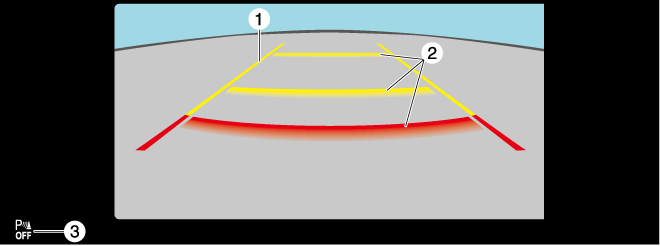
|
Indication |
Content |
|
|---|---|---|
|
1 |
Vehicle width guide lines (yellow) |
Indicates the approximate width of the vehicle. |
|
2 |
Projected vehicle path distance guide lines (red/yellow) |
These guide lines indicate the approximate distance to a point measured from the rear of the vehicle (from the end of the bumper).
|
|
3 |
Parking sensor status icon |
Indicates that the parking sensor has a problem or it is switched off. |
System problem indication
In the following cases, there might be a problem with the system. Have the vehicle inspected by an Authorized Mazda Dealer.
-
"No camera signal." is displayed on the center display.
-
The display on the center display does not switch to the camera image even if the selector lever is shifted to the R position.
-
A portion of the display on the center display is black.